
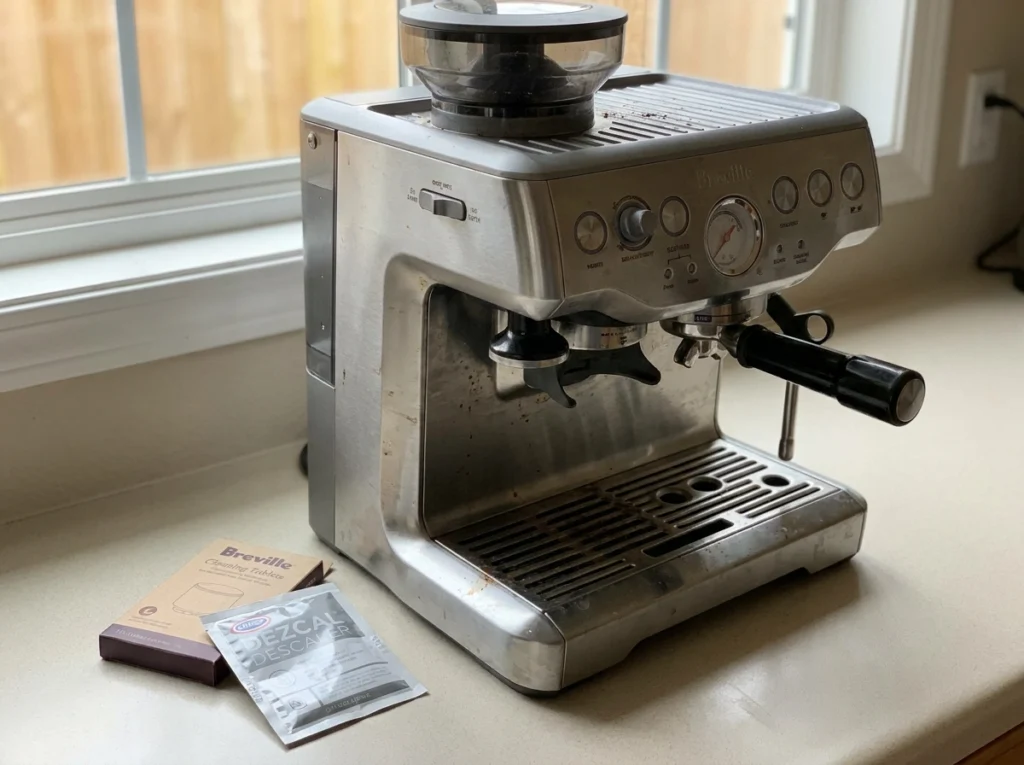
Safety: Keep hands away from the group head, hot-water outlet and steam wand while either cycle is running. Allow hot components to cool before handling them. Never mix a cleaning tablet with descaling solution, and do not remove the portafilter during an active cleaning cycle.
If your Barista Express Impress is dripping instead of flowing, or your espresso has started tasting flat, it may be time to clean or descale the machine—especially if the CLEAN/DESCALE indicator is flashing or lit solid. Those symptoms can also come from other causes, such as too fine a grind, an over-dosed or blocked basket, or stale beans, so the indicator light is your most reliable cue. The BES876 tells you when it needs attention, but it does not do the work for you—and cleaning and descaling are two separate jobs that owners often confuse.
This guide covers both, with the exact button steps to descale the Barista Express Impress, the right products to use, and how to read the maintenance light. Everything here is matched to the BES876 specifically, not a generic Breville procedure, so the lights and steps line up with the machine in front of you.
If you are still deciding whether this is the right machine, our full Breville Barista Express Impress review breaks down its performance, and our roundup of the best espresso machines of 2026 shows how it compares. Already own one? Read on.
Quick Answer: Cleaning vs Descaling
To clean the Barista Express Impress, place a cleaning tablet on the supplied cleaning disc in the 1 CUP filter basket, lock in the portafilter, then hold 1 CUP + 2 CUP + POWER for 3 seconds to run the 5-minute cleaning cycle. To descale it, remove the water filter, dissolve Breville descaler in 1 L of water, then with the machine switched off, hold 2 CUP + POWER for five seconds to enter descale mode. Press 2 CUP to run the solution through the group head, then use the dial for the steam wand and hot water outlet. Run each cycle when the CLEAN/DESCALE light tells you to—flashing for cleaning, solid for descaling.
| Cleaning cycle | Descaling | |
| What it removes | Coffee oils in the group head | Mineral scale in the Thermocoil and internal water circuit |
| What you need | Cleaning tablet + cleaning disc | Breville descaling powder + water |
| Button combo | 1 CUP + 2 CUP + POWER (3 sec) | 2 CUP + POWER (5 sec) |
| Takes | ~5 minutes | Longer (multiple passes + rinse) |
| When to run it | When the CLEAN/DESCALE light flashes | When the CLEAN/DESCALE light stays solid |
| How we verified this guide We checked every control sequence and maintenance stage against the current U.S. BES876 instruction manual and Breville’s official cleaning and descaling tutorials. Last verified September 2026. | ||
What the CLEAN / DESCALE Light Is Telling You
The Barista Express Impress has a single CLEAN / DESCALE indicator that does double duty, and reading it correctly saves you from running the wrong routine.
- Flashing light: the machine requires a cleaning cycle.
- Solid light: the machine requires a descaling cycle.
If a light will not clear after you have finished a cycle, or a button combo simply will not respond, our Barista Express Impress troubleshooting guide walks through the most common causes and fixes.
How to Run the Cleaning Cycle on the Barista Express Impress
The cleaning cycle is a back-flushing cycle, separate from descaling: it pushes water and a dissolving cleaning tablet back through the group head to clear coffee oils. It takes about five minutes and uses the parts that came in the box.
What you need
- The 1 CUP filter basket
- The supplied cleaning disc
- One Breville cleaning tablet
- A large container for the drip tray or under the spouts
Step by step
- Insert the 1 CUP filter basket into the portafilter, then drop the supplied cleaning disc into the basket.
- Place one cleaning tablet in the center of the disc.
- Lock the portafilter firmly into the group head as you would for a normal shot.
- Empty the drip tray and make sure the water tank is filled, then position a container to catch the flush water.
- With the machine switched off, press and hold 1 CUP + 2 CUP + POWER together for about 3 seconds until the cycle starts.
- Let it run untouched for about 5 minutes. Water pulses into the portafilter to dissolve the tablet and flushes back through the group head—no water should come through the portafilter spouts. The cycle ends on its own.
- Check the tablet dissolved: remove the portafilter. If any tablet remains, switch the machine off and repeat from step 5 until it is fully dissolved.
- Rinse the brew head: remove the cleaning disc, reinsert the portafilter, and press 2 CUP to flush clean water through. Wipe off any splashes, empty the drip tray, and you are done.
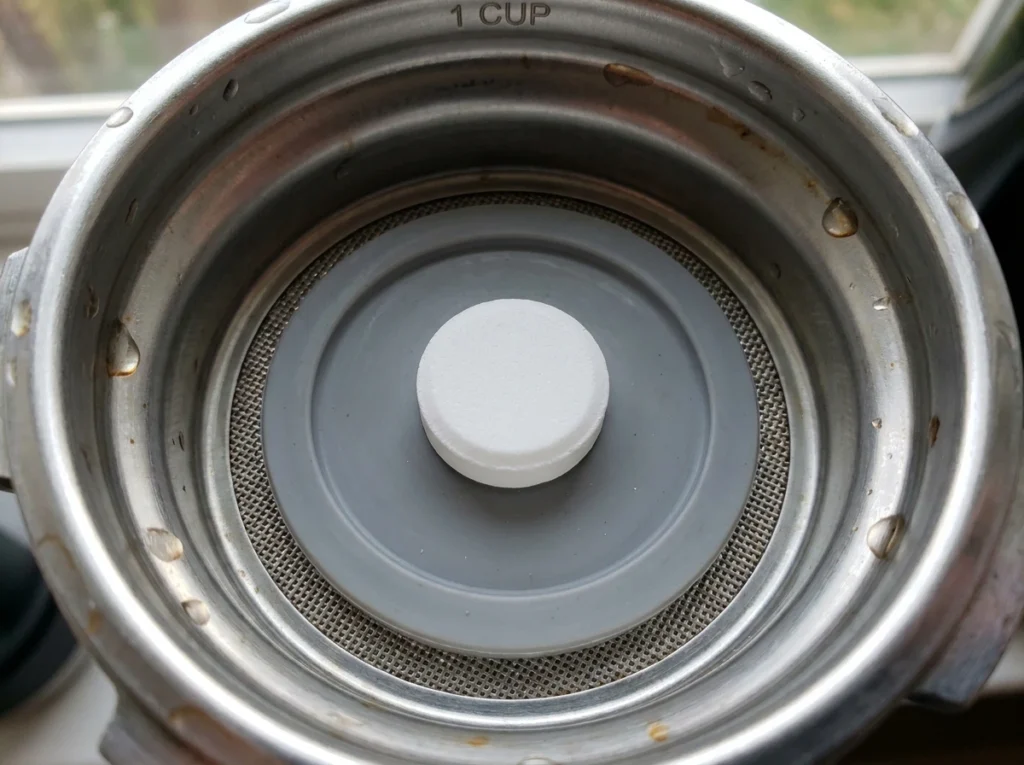
If you would rather watch it happen, Breville’s official cleaning cycle tutorial demonstrates the same sequence on video.
How to Descale the Barista Express Impress
Descaling is the deeper job. Where cleaning handles oils at the group head, descaling dissolves the mineral scale that collects inside the Thermocoil and internal water passages—Mineral buildup can reduce brewing flow, brewing temperature, machine performance and espresso quality. Here is how to descale the Barista Express Impress from start to finish.
Before you start: remove the water filter
Remove the water filter from the tank before adding the descaling solution, as Breville’s instructions require. Reinstall or replace it after the fresh-water rinse.
What you need
- One sachet of Breville descaling powder (the manufacturer-specified descaler).
- About 1 litre (34 fl oz) of water.
- A large 2-litre container to sit under the group head and steam wand.
Descaling steps
- Dissolve the descaler first. Fully dissolve one sachet of Breville descaling powder in 1 litre / 34 fl oz of water, then add the solution to the water tank and lock it in. Wait until the powder is fully dissolved before starting, and do not use bottled water—it can leave deposits inside the machine.
- Empty the drip tray and position the 2 L container so it catches liquid from both the group head and the steam wand.
- Enter descale mode: with the machine off, press and hold 2 CUP + POWER for 5 seconds. The POWER and 2 CUP buttons flash while the machine heats up.
- Wait until it is ready—the POWER button, 2 CUP button, CLEAN/DESCALE indicator, and HOT WATER/STEAM indicator all glow solid.
- Descale the coffee component: press 2 CUP. Solution runs through the group head for about 25 seconds—the 2 CUP button flashes, then turns solid with a beep when that stage finishes.
- Descale the steam component: turn the steam dial right toward the steam icon (about 13 seconds), then return the dial to STANDBY.
- Descale the hot water component: turn the dial left toward the hot water icon (about 8 seconds), then return it to STANDBY.
- Use up the solution: about half (17 fl oz / 0.5 L) will remain, so after the first coffee, steam and hot-water sequence, approximately 0.5 L of solution should remain. Repeat the coffee, steam and hot-water stages once to empty the descaling solution.
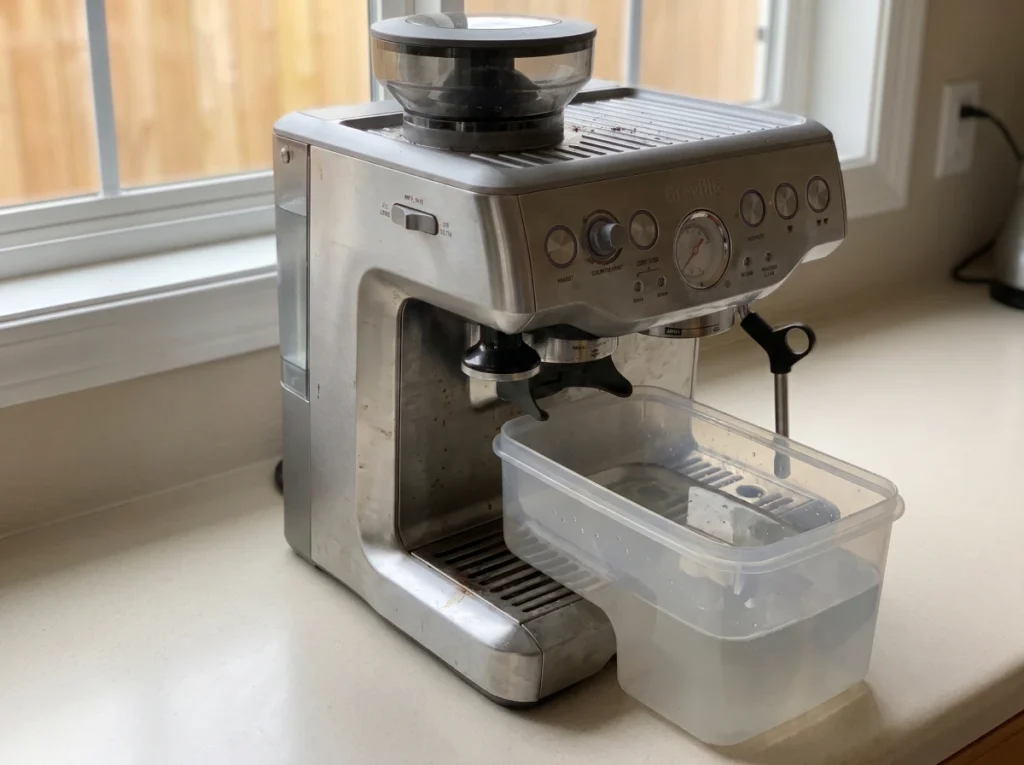
Rinse it out (do not skip this)
Descaler left in the machine tastes metallic and sour, so the rinse matters as much as the descale. Remove the tank, rinse it thoroughly, and refill with fresh water to the MAX line. Run the same group-head, steam-wand, and hot-water sequence again with clean water. Rinse the tank thoroughly, refill it to MAX with 2 L of fresh cold water, and repeat the coffee, steam and hot-water sequence to flush out the descaling solution. Press POWER to exit descale mode when the rinse is complete. If a chemical smell or taste remains, do not brew coffee; repeat the fresh-water rinse or contact Breville.
- Empty and rinse the tank, then refill with fresh cold water to the MAX line (68 fl oz / 2 L).
- Run clean water through the group head with 2 CUP, then the steam wand and hot water outlet, just as you did with the descaler.
- Repeat until the water runs completely clear so no solution remains.
- Press POWER to exit descale mode—the lights switch off—then reinsert the water filter, top up the tank, and wipe the machine down.
Breville’s own official descaling walkthrough mirrors these stages, and the full procedure is printed in the current U.S. BES876 manual. Regional revisions may differ, so if your in-box booklet varies, follow the booklet that shipped with your machine.
Can You Use Vinegar to Descale the Barista Express Impress?
It’s a common question. The BES876 instructions specify Breville descaling powder rather than vinegar. Because the manual does not provide a vinegar dilution or rinse procedure, the manufacturer-specified descaler is the safer choice. Vinegar can also leave a persistent odor and may need extra rinsing. If you use a third-party descaler, confirm the label states it is compatible with espresso machines and follow its dilution instructions.
How Often Should You Clean and Descale?
Let the machine guide you: the CLEAN/DESCALE light tells you when each cycle is due. The routine maintenance below keeps everything running between those cycles.
| Task | When to perform it |
| Cleaning cycle | When the CLEAN/DESCALE light flashes |
| Descaling | When the CLEAN/DESCALE light remains solid |
| Water-filter replacement | Every three months; sooner in hard-water areas |
| Portafilter and basket | Rinse after use |
| Steam wand | Wipe and purge after every milk drink |
| Drip tray | Empty and clean regularly |
Replacing the water filter every three months (sooner with hard water) reduces how often descaling is needed. Remember the grinder is a separate maintenance job—the burrs need their own routine, which we cover in our Barista Express Impress grinder cleaning guide.
Descale Light Won’t Reset?
Confirm that you completed the coffee, steam, hot-water, and fresh-water rinse stages. If the light remains after following the current manual from beginning to end, avoid repeatedly adding descaler and contact Breville support.
The Bottom Line
Cleaning and descaling are separate procedures on the Barista Express Impress. A flashing CLEAN/DESCALE light calls for the tablet cleaning cycle, while a solid light calls for descaling. Use the correct button combination, remove the water filter before descaling, complete every water path, and finish the fresh-water rinse. Following the BES876 manual closely is the safest way to protect performance and avoid maintenance mistakes.
Frequently Asked Questions
With the machine switched off, press and hold the 2 CUP and POWER buttons together for 5 seconds. The POWER and 2 CUP buttons flash as it heats, and the machine is ready once the POWER button, 2 CUP button, CLEAN/DESCALE indicator, and HOT WATER/STEAM indicator are all solid. Then press 2 CUP to begin the coffee-component pass.
The manual specifies Breville descaling powder—dissolve one sachet in 1 litre / 34 fl oz of water. If you use a third-party descaler, confirm its label states compatibility with espresso machines and follow its dilution instructions.
Descale when the CLEAN/DESCALE light stays solid. Breville doesn’t publish a fixed interval for the BES876; replacing the water filter every three months (sooner in hard-water areas) reduces how often descaling is needed.
The BES876 manual specifies Breville descaling powder rather than vinegar, so that is the safest choice. Vinegar can leave a persistent odor and may need extra rinsing. If you use a third-party descaler, check that its label states espresso-machine compatibility and follow its dilution.
The cleaning cycle flushes coffee oils from the group head using a tablet and takes about five minutes. Descaling removes mineral scale from the Thermocoil and internal water passages using a descaling solution and takes longer. They are separate jobs with different button combinations.
Make sure you completed the coffee, steam, hot-water, and fresh-water rinse stages. If it stays on after following the manual from start to finish, don’t keep adding descaler—contact Breville support.
Yes. Remove the water filter from the tank before adding the descaling solution, as Breville’s instructions require. Reinstall or replace it after the fresh-water rinse.
Related Articles
Share your coffee experience
Have you tried this product? Add a thoughtful review or ask a question.
3 Responses